 19150ca292
<!--
Thanks for sending a pull request!

Here are some tips for you:
  1. If this is your first time, please read our contributor guidelines: https://kyuubi.readthedocs.io/en/latest/community/contributions.html
  2. If the PR is related to an issue in https://github.com/apache/incubator-kyuubi/issues, add '[KYUUBI #XXXX]' in your PR title, e.g., '[KYUUBI #XXXX] Your PR title ...'.
  3. If the PR is unfinished, add '[WIP]' in your PR title, e.g., '[WIP][KYUUBI #XXXX] Your PR title ...'.
-->

### _Why are the changes needed?_
<!--
Please clarify why the changes are needed. For instance,
  1. If you add a feature, you can talk about the use case of it.
  2. If you fix a bug, you can clarify why it is a bug.
-->

### _How was this patch tested?_
- [ ] Add some test cases that check the changes thoroughly including negative and positive cases if possible

- [ ] Add screenshots for manual tests if appropriate

- [ ] [Run test](https://kyuubi.readthedocs.io/en/latest/develop_tools/testing.html#running-tests) locally before make a pull request

Closes #951 from pan3793/license.

Closes #951

4629eecd [Cheng Pan] Fix
c45a0784 [Cheng Pan] nit
b9a46b42 [Cheng Pan] pin license header at first line
80d1a71b [Cheng Pan] nit
b2a46e4c [Cheng Pan] Update
f6acaaf8 [Cheng Pan] minor
ef99183f [Cheng Pan] Add license header on all docs

Authored-by: Cheng Pan <chengpan@apache.org>
Signed-off-by: Cheng Pan <chengpan@apache.org>
(cherry picked from commit a76c344042)
Signed-off-by: Cheng Pan <chengpan@apache.org>
3.7 KiB

Getting Started with Kyuubi and Cloudera Hue
What is Hue
Hue is an open source SQL Assistant for Databases & Data Warehouses.
Preparation
Get Kyuubi Started
Get the server Started first before your try Hue with Kyuubi.
Welcome to
  __  __                           __
 /\ \/\ \                         /\ \      __
 \ \ \/'/'  __  __  __  __  __  __\ \ \____/\_\
  \ \ , <  /\ \/\ \/\ \/\ \/\ \/\ \\ \ '__`\/\ \
   \ \ \\`\\ \ \_\ \ \ \_\ \ \ \_\ \\ \ \L\ \ \ \
    \ \_\ \_\/`____ \ \____/\ \____/ \ \_,__/\ \_\
     \/_/\/_/`/___/> \/___/  \/___/   \/___/  \/_/
                /\___/
                \/__/
Run Hue in Docker
Here we demo running Kyuubi on macOS and Hue on Docker for Mac, there are several known limitations of network, and you can find workarounds from here.
Configuration
- Copy a configuration template from Hue Docker image.
docker run --rm gethue/hue:latest cat /usr/share/hue/desktop/conf/hue.ini > hue.ini
- Modify the
hue.ini
[beeswax]
  # Kyuubi 1.1.x support thrift version from 1 to 10
  thrift_version=7
  # change to your username to avoid permissions issue for local test
  auth_username=chengpan

[notebook]
  [[interpreters]]
    [[[sql]]]
      name=SparkSQL
      interface=hiveserver2

[spark]
  # Host of the Spark Thrift Server
  # For macOS users, use docker.for.mac.host.internal to access host network
  sql_server_host=docker.for.mac.host.internal

  # Port of the Spark Thrift Server
  sql_server_port=10009

# other configurations
...
Start Hue in Docker
docker run -p 8888:8888 -v $PWD/hue.ini:/usr/share/hue/desktop/conf/hue.ini gethue/hue:latest
Go http://localhost:8888/ and follow the guide to create an account.

Having fun with Hue and Kyuubi!

For CDH 6.x Users
If you are using CDH 6.x, there is a trick that CDH 6.x blocks Spark in default, you need to modify the configuration to
overwrite the desktop.app_blacklist to remove this restriction.
Config Hue in Cloudera Manager.

Refer following configuration and tune it to fit your environment.
[desktop]
 app_blacklist=zookeeper,hbase,impala,search,sqoop,security
 use_new_editor=true
[[interpreters]]
[[[sparksql]]]
  name=Spark SQL
  interface=hiveserver2
  # other interpreters
  ...
[spark]
sql_server_host=kyuubi-server-host
sql_server_port=10009
You need to restart the Hue Service to activate the configuration changes, and then Spark SQL will available in editor list.
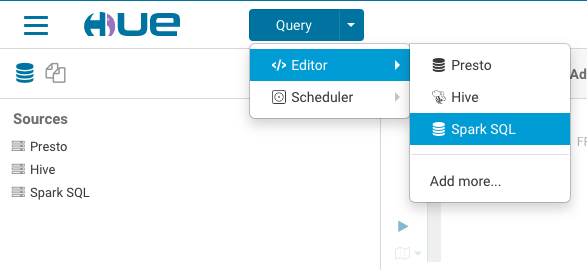
Having fun with Hue and Kyuubi!
